
Dear Members,
In this post you will learn about TC Editor and its uses...
SO FRIENDS LETS START LESSON
- TC Editor :-
TC editor also provides a powerful debugging feature. This means that it helps to detect and remove errors in the C program.
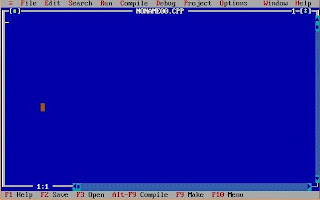
Once Turbo C compiler is installed. It is very easy to write,compile and execute C programs, Turbo C editor has an executable file "TC.EXE". By default, it is in "TC" directory in C drive. When the file is executed, the IDE of Turbo C editor is displayed on the screen along with development tools.
To load Turbo C editor, follows these steps :-
- Go to DOS prompt. By default, it will appear as:
C:\Windows>
- Change the directory to TC by applying command;
C:\Windows> CD\TC [press Enter Key]
- Type TC and press Enter Key. The turbo C editor is started and IDE appears on the screen as shown below.
Note :-
Today, in most computers Turbo C++ compiler is installed. If Turbo C++ compiler is installed in your computer, then the path of TC.EXE is:
C:\TC\BIN
