Showing posts with label Turbo C. Show all posts

Sunday, 19 February 2012

Installing Turbo C


Dear Members,
          In this lesson we tell you How to install Turbo C Editor? and setting up directories ...
SO FRIENDS LETS START OUR LESSON
  •  Installing Turbo C :-
                          Turbo C compiler is commonly available on CD's. When you install the Turbo C compiler, the TC directory is created on the hard disk and various sub directories such as INCLUDE, and LIB etc. are created under TC.
                    INCLUDE :-         Contains the header files of C.
                         LIB :-                 Contains the library files of C.

                     When Turbo C is installed, the above mentioned directory structure is automatically created and their respective files are copied into them.
           The installing process of Turbo C is very easy. It provides "install" program used to install the Turbo C compiler. Simply, run the install program and follow the instructions such as ; the directory name and path where you want to install the system (Turbo C compiler). By default, directory name is TC on the root of drive C.
  • Setting Up Directories :-
By default, the source files, object files and executable files are stored in the current directory (or TC directory). You can set specific directory paths to store source files and output files (i.e. object and executable files).

             To set the directory path, follow these steps.
  • Select "Directories" from "options" menu of Turbo C editor, a window will appear as shown below.
 
  •                       Set the path of header files in the "include Directories" field such as " C:\TC\INCLUDE". 
  •                       Set the path of library files in the "Library Directories" field such as " C:\TC\LIB ".
  • In "Output Directory", the compiler stores the object files and linker stores the 'exe' files. Set the path for output files.
  • In "Source Directories", the source files are stored. Set the path for source files.

Friday, 10 February 2012

TC Editor


Dear Members,
                 In this post you will learn about TC Editor and its uses...
SO FRIENDS LETS START LESSON
  • TC Editor :-
In addition to a compiler, Turbo C or TC provides a complete IDE to create, edit, save, compile and run C programs. It is called the TC Editor. The C compiler is linked with TC Editor. This type of editor is also called linkage editor.
                     TC editor also provides a powerful debugging feature. This means that it helps to detect and remove errors in the C program.
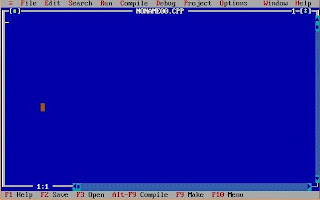
                              Once Turbo C compiler is installed. It is very easy to write,compile and execute C programs, Turbo C editor has an executable file "TC.EXE". By default, it is in "TC" directory in C drive. When the file is executed, the IDE of Turbo C editor is displayed on the screen along with development tools.
               To load Turbo C editor, follows these steps :-
  • Go to DOS prompt. By default, it will appear as:

C:\Windows>
  • Change the directory to TC by applying command;

C:\Windows> CD\TC  [press Enter Key]
  • Type TC and press Enter Key. The turbo C editor is started and IDE appears on the screen as shown below.
Note :-
             Today, in most computers Turbo C++ compiler is installed. If Turbo C++ compiler is installed in your computer, then the path of TC.EXE is: 
C:\TC\BIN